Posts

Showing posts with the label sharp school

Staff Resource Page in SharpSchool

Image
I have opened up a Staff Resource Page for the faculty at CHHS. If you attended Mr. Bass's session during our last Professional Development Day, you are aware of the Staff page. This page is ONLY accessible for CHHS Staff members only. I will also house the "Good News to Share" questionnaire and the CHHS Directory under this page for easy access. Let me know if you would like anything else under this page. 

Sync GFiles to Sharp School Webpage

Image
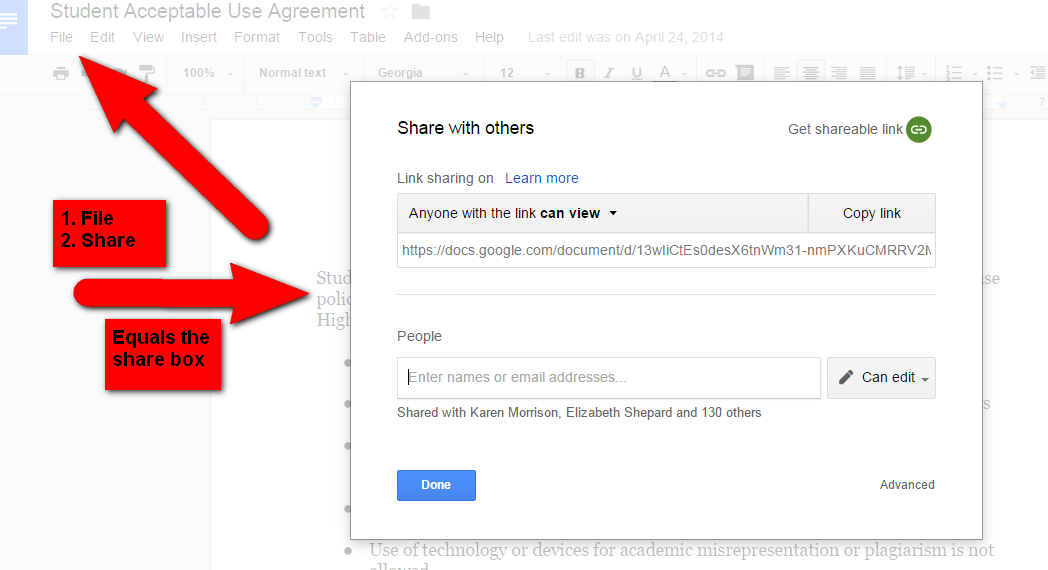
Syncing Google Files to the Sharp School Teacher Webpage Sign-in to your Google Drive Open the File you wish to sync to your teacher webpage. Click on File > Share 4.  Make sure you select “Anyone with the link can view” and COPY link. 5. Sign-in to your Sharp School Webpage 6. Staff Directory 7. Your teacher webpage 8. Go to your Document Container Page (or however you named it) 9. Click on Advanced > Switch to Design Mode 10. Under “Add New Item” drop down box, Select “link” 11. Type in the Name that you want to appear in the Document Container. 12. Paste the File Link 13. Click Add Link Viola: Note: If you do not have a Document Container page, Go to your teacher Homepage> Page Properties> Add New Page> Document Container. Also, you can organize your document container page by adding class folders by selecting in the “Add New Item” drop down and select “Folder”. Any questions, please email me at megancox@joh...

Webpage Profile

Image
Please take 3 minutes to do this today. I have included directions for you as follows: Login to SharpSchool using your computer username and password> Click on your name at the top of the page to update your SharpSchool Profile> Edit User > User Profile > Update User > User Profile Photo Make sure to add a professional profile photo and information. Keep it professional - years of experience, degree information, professional goals, accomplishments. Remember this is your first impression to the community you serve! Sharp School Photo Choices are (in this order): 1. Professional looking photo (no avatars or icons) 2. or, c lick to download   School Logo  to upload  Need a refresher?  The Skinny on Sharp School

Sharp School Tutorials Folder

Image
Do you need any assistance designing your Sharp School webpage? I have compiled some  short tutorials  to help you get started. If you have any additional questions and/or need some 1:1 assistance, please let me know!  Click HERE to check out the Sharp School Tutorials.

Sharp School Discussion Forum

Image
To create a Discussion Forum page on your Sharp School Teacher webpage, please follow the following instructions: 1. Login to your Sharp School teacher webpage 2. Go to "Page Properties" > "Add a New Page"> "Blog Page" 3. Create a "Title" > Click the blue arrow (this will create the name by default) 4. Click "Security" and select Permissions Granted to "Guest" > "Add Content" and "Read" > "Add"> "Apply" at the bottom. ***Under "Manage Forum", make sure it is checked "enabled".  **** Also, w hen the image is locked the page is unlocked. When the image is unlocked the page is locked.  If you have any more questions, please email me at megancox@johnston.k12.nc.us