Posts

Showing posts with the label google docs

Capitalization in Google Docs
Image
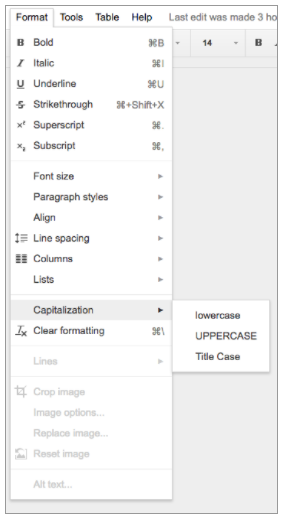
Capitalizing a large portion of text or an especially long title can be a pain. Doing the opposite—converting capital letters to lowercase—is equally a waste of time. Simply choose “Capitalization” from the Format menu in Docs, and select one of the following: lowercase, to make all the letters in your selection lowercase. UPPERCASE, to capitalize all the letters in your selection. Title Case, to capitalize the first letter of each word in your selection.
Columns in Google Docs

Image
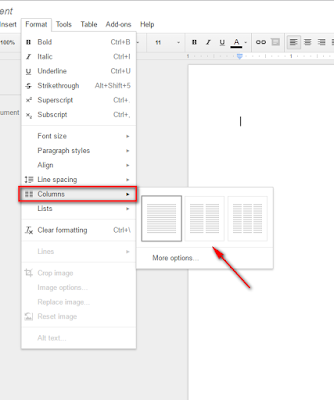
COLUMNS are finally available in Google Docs! Select Format -> Columns option allows you to add the columns to your document. You can select 2 or 3 columns for your document Once you have your columns inserted, you can go to more options to set your margins and spacing between columns, you can also add a line in between your columns: If you select the line it will appear as you start the second column of text and will look something like this:

Export Google Docs as EPUB file

Image
EPUB  is the most widely supported file format for publishing accessible documents and digital books, allowing people to consume long-form content in their preferred apps on a diverse range of screen sizes and devices, including smartphones, tablets, and eReaders. To make it easier for authors, publishers, and academic institutions to create works that can be consumed digitally, today we’re launching the ability to export Google Docs files as EPUB publications. Simply go to the  File menu > Download as > EPUB Publication (.epub) .

Google Docs and Classroom

Image
Google released new updates yesterday for Google Docs and Classroom. Google developers have been hard at work over the summer making Google even more useful for education. Please see the post below from the  Google blog  for all the details. Schoolwork, minus the work Writing papers is now a lot easier with the  Research  tool in  Docs for Android . You can search Google without leaving Docs, and once you find the quotes, facts or images you’re looking for, you can add them to your document with just a couple taps. That means less time switching between apps, and more time perfecting your thesis statement. With  Voice typing , you can record ideas or even compose an entire essay without touching your keyboard. To get started, activate Voice typing in the Tools menu when you're using  Docs  in Chrome. Then, when you’re on the go, just tap the microphone button on your phone’s keyboard and speak your mind. Voice typing is available in more th...